
Laundry order management that keeps the counter moving
Presso’s dry cleaning POS takes every ticket from counter tap to completed order — two-pane intake, a live order status board and every payment in between — in English and Arabic.
A full ticket in under a minute
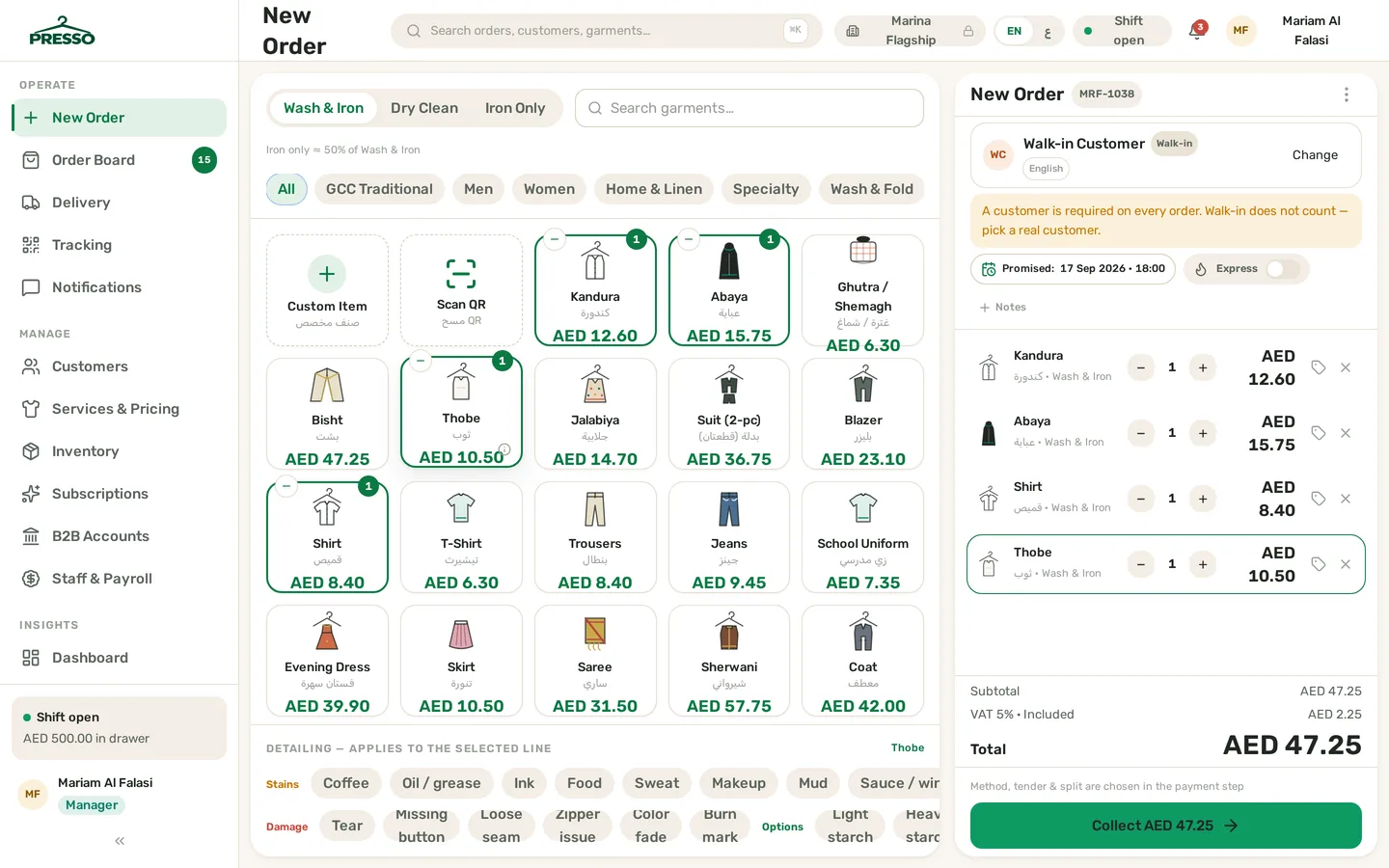
The new-order screen is built for a busy counter: garment tiles on the left, the ticket building live on the right. Tap a kandura, an abaya, a ghutra or a suit, pick the service — wash & iron, dry clean or iron only — and the price in AED is already there, VAT included.
- GCC garment tiles out of the box — kandura/thobe, abaya, ghutra/shemagh, bisht, suits, curtains, carpets per m² and wash & fold per kg
- Stain, damage and color chips in English & Arabic — a bukhoor mark or pulled seam is noted once at detailing and visible to the whole team
- Express toggle adds the +50% surcharge automatically and stamps the promised time on the ticket
- Cash, card, split and on-account payments — every one closes with an FTA-compliant receipt
Every stage visible — nothing quietly late
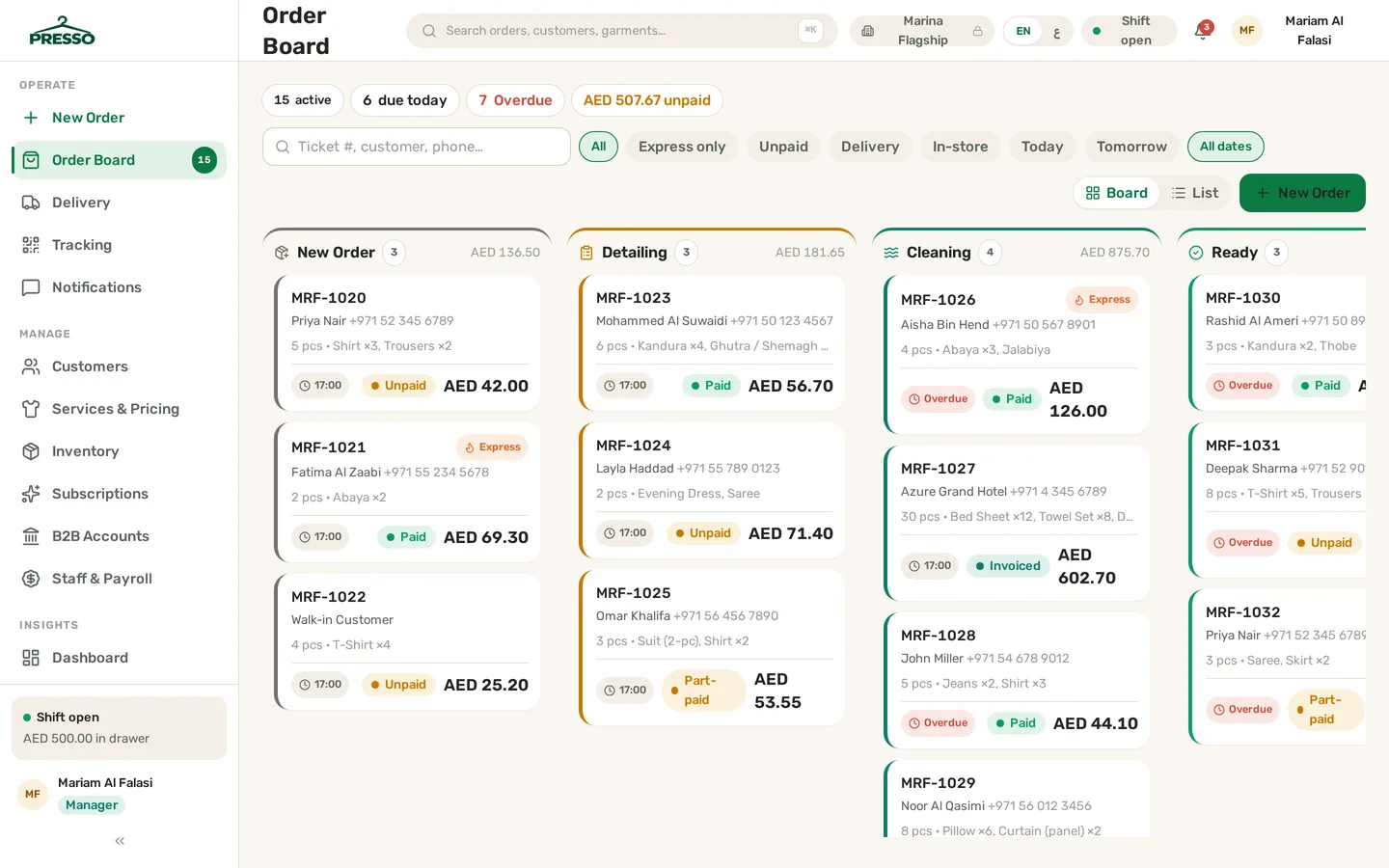
The board is Presso’s home screen, and its tabs are your workflow: New → Detailing → Cleaning → Ready → Out for Delivery → Completed. Cashiers see what to work next; managers see what is stuck, and for how long.
- Stage history timeline on every ticket — who moved it, when, and which rack it sits on now
- Overdue tickets stand out against their promised time — before the customer calls to ask
- Pre-Eid kandura and abaya surges stay manageable: per-stage counts show the backlog building early
- Ready orders hand straight into pickup & delivery runs with driver assignment and COD tracking
Small details that save the day
Six quiet capabilities that turn a rushed counter into a calm one — at intake, on the rack and at handover.
Custom item tile
The odd piece always shows up — a bridal bisht, a carpet runner, a delicate saree. Add a custom item with its own price and care note, straight into the ticket.
QR scan at intake & handover
Scan the ticket’s QR or barcode to pull the order up in seconds — no calling ticket numbers across the shop, no wrong-bag handovers.
Rack location assignment
Every ready ticket carries a rack location, so orders are found in seconds — even on the busiest Eid eve, when every rail is full.
Remembered preferences
Starch level, hanging or folded, fragrance-free — customer preferences are saved once and suggested on the next ticket, in the customer’s language.
Per-branch ticket numbers
Tickets and invoices number sequentially per branch, keeping your records clean and FTA-friendly as you grow from one counter to many.
Walk-in & account customers
Serve a walk-in in seconds, or attach the ticket to a saved customer with full history, wallet balance and on-account terms for regulars.
Order management questions
Can I serve a walk-in customer without creating a profile?
How does the express surcharge work?
How do I see which orders are running late?
Works with the rest of Presso
Orders are the core — these features plug straight into the ticket.
Garment QR tracking
Per-garment QR labels, rack locations and a full stage timeline — find any item in seconds.
Explore →WhatsApp notifications
Automatic bilingual updates at every stage — received, cleaning, ready, out for delivery.
Explore →UAE VAT compliance
FTA-compliant tax invoices with your TRN, sequential numbering and credit notes.
Explore →Ready to run a smarter laundry?
Book a free demo and see Presso handle orders, delivery and VAT invoicing for your laundry — or explore the live demo yourself.